CuboAi Sleep Sensor Pad Review: The Smartest Way to Monitor Your Baby’s Sleep.
⭐ Our Quick Verdict
★★★★☆
4.3 / 5 – Excellent for CuboAi users. A genuine peace-of-mind upgrade.
The CuboAi Sleep Sensor Pad uses 4 motion sensors and AI camera integration to alert parents the moment their baby stops moving in the crib. It is contactless, simple to install, and HSA/FSA Eligible
🛒 Check Price on Amazon 🏠 Buy from CuboAi Official
Every parent knows that feeling. Your baby has finally fallen asleep, but you still lie awake wondering: Is everything okay in there? The CuboAi Sleep Sensor Pad was built for exactly this moment.
This pad sits quietly under your baby’s mattress. It tracks every tiny movement – including the subtle rise and fall of breathing. And when something seems off, it alerts you right away.
But is it worth the price? And does it actually work? In this review, we break down everything you need to know – from features and setup to real pros, cons, and how it stacks up against the competition.
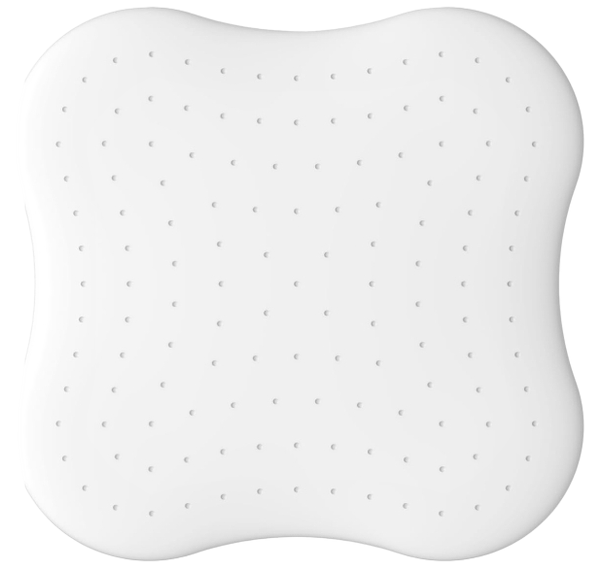
CuboAi Sleep Sensor Pad
🤔What Is the CuboAi Sleep Sensor Pad?
The CuboAi Sleep Sensor Pad is an under-mattress baby breathing motion monitor. It slides beneath your baby’s crib mattress and stays completely out of sight. So your baby sleeps naturally – no wires, no wearables, no disruption.
The pad uses 4 motion sensors to detect micro-movements on the mattress surface. These micro-movements include breathing motion – the tiny chest movements your baby makes while sleeping. If the sensors detect nothing while your baby is in the crib, you get an instant alert.
But the real power comes from the AI integration. The CuboAi Sensor Pad works together with the CuboAi Plus camera (or CuboAi Monitor 3) to create a two-layer safety net. The camera confirms your baby is in the crib. The pad confirms your baby is moving. Together, they dramatically reduce false alarms.
⚠️ Important Note
The CuboAi Sleep Sensor Pad is not a medical device. It cannot diagnose, treat, or prevent any medical condition – including Sudden Infant Death Syndrome (SIDS). It is a peace-of-mind tool designed to help parents monitor breathing motion patterns. Always follow safe sleep guidelines from the AAP.
Who Is This Product For?
- First-time parents who want extra reassurance at night
- Families already using a CuboAi Plus or CuboAi Monitor 3
- Parents who dislike wearable baby monitors (no sock, no clip, no strap)
- Anyone looking for a one-time “set it and forget it” sleep safety tool
- Caregivers wanting HSA/FSA-eligible baby tech
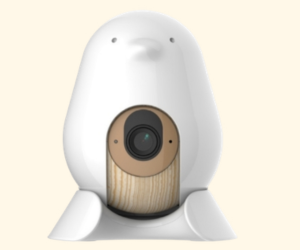
CuboAI Plus Smart Baby Monitor 3
✓ Covered Face & Rollover Alerts
✓ 1080p HD Night Vision
✓ Sleep Analytics Reports
✓ Automatic Growth Tracker
📋CuboAi Sleep Sensor Pad – Full Specs
| Specification | Detail |
|---|---|
| Number of Sensors | 4 motion sensors |
| Connectivity | Bluetooth 5.0 |
| Power Source | 4 AAA Alkaline Batteries (included) |
| Weight | 465g / 16.4 oz |
| Mattress Thickness | 2.36″ – 5.12″ (6-13 cm) |
| Compatible Monitors | CuboAi Plus / CuboAi Monitor 3 |
| App Compatibility | iOS 16+ / Android 12+ |
| Coverage vs. Competitors | 4× wider sensor coverage |
| Design | Non-contact, water-resistant, non-slip base |
| HSA/FSA Eligible | Yes ✓ |
Battery note: Only alkaline AAA batteries work in the CuboAi Sleep Sensor. Rechargeable and carbon-zinc batteries are not supported. Some parents report replacing batteries every one to two weeks depending on use.
✨Key Features of the CuboAi Sleep Sensor Pad
1. Four-Sensor Micro-Motion Detection
Most under-mattress sensors use one or two sensors. The CuboAi Pad uses four sensors spread across the pad. This gives it coverage four times wider than many competing products.
Why does this matter? Because babies move around. A single sensor placed in the center might miss subtle chest movements if your baby shifts to one side of the crib. Four sensors make sure every little motion gets picked up – no matter where your baby is lying.
2. AI Mode – Camera and Sensor Work Together
This is what truly sets the CuboAi Sleep Sensor apart from basic under-mattress pads. When you enable AI Mode in the CuboAi app, the camera and the pad team up.
Here is how it works: The camera AI first checks that your baby is actually in the crib. Then the pad checks for movement. So if the camera sees your baby – but the pad detects no breathing motion – you get an immediate alert. This two-step system means you will not get false alarms when the crib is simply empty.
Featured Snippet Answer: The CuboAi Sleep Sensor Pad works by placing four motion sensors under the baby’s crib mattress to detect breathing micro-movements. It connects via Bluetooth to the CuboAi app. When used in AI Mode, the camera confirms the baby is in the crib, and if the pad detects no movement, parents receive an instant safety alert.
3. Non-Contact, One-Time Installation
Unlike wearable monitors that need a fresh setup every bedtime, the CuboAi Sleep Sensor Pad is a one-time install. You lift the mattress, slide the pad onto the crib slats, lower the mattress back – and you are done.
The pad stays hidden underneath. Your baby sleeps in the most natural environment possible, with nothing touching them. No sock, no clip, no chest strap. Just peaceful, contactless monitoring every night.
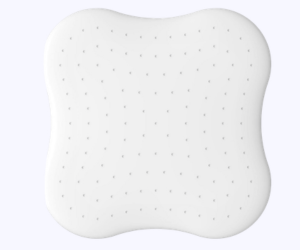
CuboAi Sleep Sensor Pad
✓ 4 motion sensors – 4× wider coverage
✓ Contactless, one-time install
✓ Instant alert if no movement detected
✓ HSA/FSA eligible
4. Real-Time Sleep Analytics in the App
The CuboAi app shows live micro-movement data right on the home screen – next to the live camera feed. So you can see at a glance how active or still your baby is throughout the night.
The app also tracks sleep patterns over time: when your baby fell asleep, how long they slept, how many times they moved, and when caregivers visited. This data is incredibly useful during sleep training or when adjusting nap schedules.
💡 Pro Tip
Enable AI Mode in the CuboAi app settings to unlock the dual-layer alert system. Without AI Mode, the pad still tracks movements – but the two-sensor confirmation system will not be active.
5. Water-Resistant and Non-Slip Design
The CuboAi Sensor Pad is built for real life with babies. The water-resistant body handles any overnight leaks without damage. And the non-slip rubber rim keeps the pad firmly in position – even if your baby is a wriggly sleeper. This means the sensors always stay accurately positioned under your baby’s body.
🔧How to Set Up the CuboAi Sleep Sensor Pad (Step-by-Step)
What You Need Before You Start
- A CuboAi Plus or CuboAi Monitor 3 (the pad does not work alone)
- 4 AAA alkaline batteries
- A smartphone with iOS 16+ or Android 12+
- The CuboAi app installed and set up
- A slatted crib frame with a mattress 2.36″-5.12″ thick
Step-by-Step Installation Guide
How to Set Up the CuboAi Sleep Sensor Pad
- Insert the batteries.
Open the battery compartment and insert 4 AAA alkaline batteries. Only alkaline batteries are supported.
- Lift your crib mattress.
Carefully lift the mattress up and set it aside temporarily.
- Place the pad on the slatted frame.
Center the CuboAi Sleep Sensor Pad on the bed slats, directly below where your baby’s torso will rest.
- Lower the mattress back down.
Place the mattress back on top of the pad. The pad should be completely out of sight.
- Open the CuboAi app.
Tap Settings, then select “Sleep Sensor Pad Tutorial.”
- Follow the in-app pairing steps.
The app guides you through connecting the pad to your CuboAi camera via Bluetooth 5.0. This takes about one minute.
- Enable AI Mode.
Turn on AI Mode in the app settings to activate the camera + sensor dual-alert system.
- Test the setup.
Gently press the mattress surface and confirm the app registers movement. You are ready to go.
Best Mattress Types for Optimal Accuracy
| Mattress Type | Works Well? | Notes |
|---|---|---|
| Spring-based | ✅ Best | Recommended by CuboAi |
| Coir-based | ✅ Best | Recommended by CuboAi |
| Spring/Coir combination | ✅ Best | Recommended by CuboAi |
| Memory foam | ⚠️ Contact support | May reduce sensor accuracy |
| Latex | ⚠️ Contact support | May reduce sensor accuracy |
If your mattress is outside the 2.36″-5.12″ thickness range or is not a spring or coir type, contact CuboAi support at support@getcubo.com before purchasing.
⚖️CuboAi Sleep Sensor Pad – Pros and Cons
👍 Pros
- Contactless – no wearables needed
- 4 sensors = 4× wider coverage
- AI Mode cuts false alarms significantly
- One-time install, truly hassle-free
- Water-resistant and non-slip
- HSA/FSA eligible
- Detailed sleep analytics in the app
- Setup takes under 2 minutes
👎 Cons
- Requires CuboAi Plus or Monitor 3
- Batteries may need weekly replacement
- No heart rate or SpO2 tracking
- Mattress type/thickness restrictions
- Premium AI features need a subscription (~$8/mo after year 1)
- No visual indicators for motion levels
🔁CuboAi Sleep Sensor Pad vs. Competitors
| Feature | CuboAi Sleep Sensor Pad | Owlet Dream Sock | Angelcare Sensor Pad |
|---|---|---|---|
| Type | Under-mattress pad | Wearable sock | Under-mattress pad |
| Contactless | ✅ Yes | ❌ No | ✅ Yes |
| AI Camera Integration | ✅ Yes | ❌ No | ❌ No |
| Heart Rate / SpO2 | ❌ No | ✅ Yes | ❌ No |
| Nightly Setup | None – one-time install | Put sock on each night | None – one-time install |
| False Alarm Reduction | Dual AI-layer system | Basic alerts | Single sensor |
| HSA/FSA Eligible | ✅ Yes | ✅ Yes | Check retailer |
| Approx. Price (Pad Only) | ~$79-$99 | ~$149 (sock only) | ~$79 |
The biggest advantage of the CuboAi Sleep Sensor over Angelcare and Babysense is the AI camera confirmation layer. Without this, under-mattress pads can trigger false alarms simply because the baby moved out of position. The CuboAi system checks that the baby is actually present before sending an alert.
Compared to the Owlet Dream Sock, the CuboAi Pad wins on convenience – no nightly strapping on of a sock. But the Owlet wins if you specifically want heart rate and blood oxygen data, which the CuboAi pad does not provide.
CuboAI Plus Smart Baby Monitor 3
✓ Covered Face & Rollover Alerts
✓ 1080p HD Night Vision
✓ Sleep Analytics Reports
✓ Automatic Growth Tracker
💬What Real Parents Are Saying
Independent testing by parenting sites consistently rates the CuboAi Plus bundle – including the Sleep Sensor Pad – at 4.3 to 4.5 out of 5 stars. Reviewers frequently praise how easy the setup is and how reassuring the real-time micro-movement data feels.
Parents of wriggly babies especially love the four-sensor coverage. Even when a baby shifts to the edge of the crib, the sensors still track motion accurately. One Mumsnet reviewer with a three-month-old described checking the app mid-night and seeing detailed movement data – giving her the confidence to stay in bed rather than getting up to check manually.
The most common criticism is battery life. Some parents find they need fresh alkaline batteries every week or two, which adds a small ongoing cost and requires a supply of AAA batteries on hand at all times.
🎯Is the CuboAi Sleep Sensor Pad Worth It?
Buy It If…
- You already own or plan to buy a CuboAi Plus or CuboAi Monitor 3
- You want zero-fuss contactless monitoring (no wearables)
- You are a first-time parent or an anxious caregiver needing extra data
- Your baby uses a spring or coir mattress in the correct thickness range
- You want to use HSA or FSA funds for baby safety tech
Skip It If…
- You do not own a compatible CuboAi camera (it will not work standalone)
- Your crib mattress is memory foam, latex, or outside 2.36″-5.12″ thick
- You specifically need heart rate or blood oxygen level monitoring
- You are looking for a budget monitor without subscription costs
❓ CuboAi Sleep Sensor Pad Frequently Asked Questions
No. The CuboAi Sleep Sensor Pad must be paired with a CuboAi Plus or CuboAi Monitor 3. It does not function as a standalone device. The camera is required for AI Mode and alert delivery.
It uses 4 AAA alkaline batteries. Rechargeable batteries, carbon-zinc batteries, and other battery types are not supported. Battery life varies – some parents replace them every one to two weeks.
No. The CuboAi Sleep Sensor Pad is not a medical device. It cannot diagnose, treat, or prevent any medical condition including Sudden Infant Death Syndrome. It is a breathing motion tracker designed for parental peace of mind – not a replacement for medical care or adult supervision.
Spring-based, coir-based, and spring/coir combination mattresses work best. The mattress must be between 2.36″ and 5.12″ (6-13 cm) thick. Memory foam and latex mattresses may reduce sensor accuracy – contact CuboAi support if you have one of these mattress types.
AI Mode links the camera and the sensor pad together. The camera AI first confirms your baby is in the crib. Only if the baby is confirmed present – and the pad detects no motion – will an alert be sent. This two-layer check prevents alerts when the crib is simply empty.
Yes. The CuboAi Sleep Sensor Pad is HSA/FSA eligible. This means you may be able to purchase it using pre-tax health savings account funds, potentially reducing your out-of-pocket cost.
Basic monitoring features are free. However, the full AI detection mode – which links the camera and pad for dual-layer alerts – requires the CuboAi premium plan. The first year is free. After that, the plan costs approximately $8 per month, or $80 per year if paid in advance.
Place it in the center of the crib, under the mattress on the slatted frame. Centering the pad ensures all four sensors cover the full width of the mattress and pick up movements regardless of where your baby is lying.
🏆Final Verdict
The CuboAi Sleep Sensor Pad is one of the most thoughtfully designed baby sleep monitors on the market. It solves a real problem – middle-of-the-night parental anxiety – with a genuinely smart solution. Four sensors, AI camera integration, contactless design, and one-time installation all add up to a product that actually earns its place in your nursery.
The main catch is that it only works with a CuboAi camera. So if you are already in the CuboAi ecosystem – or planning to join it – the Sleep Sensor Pad is an easy recommendation. It adds a meaningful layer of safety data without adding any nightly fuss.
If you need clinical-grade heart rate or oxygen monitoring, look at the Owlet Dream Sock instead. But for contactless, AI-powered breathing motion tracking with smart alerts, the CuboAi Sleep Sensor Pad is excellent.
⭐ Final Rating: 4.3 / 5
★★★★☆
Smart AI integration · Contactless design · Easy setup · HSA/FSA eligible · Subscription required for full features
🛒 Check Latest Price on Amazon 🌐 Visit CuboAi Official Site
CuboAi Sleep Sensor Pad
✓ 4 motion sensors – 4× wider coverage
✓ Contactless, one-time install
✓ Instant alert if no movement detected
✓ HSA/FSA eligible